CLICK ON IMAGE AND JOIN


LIKE FB PAGE

Sunday, 19 January 2014

TAGGED UNDER:

How to Speedup Pen-drive File Transfer


USB flash drives are a great way to transfer files between computers, it handles a lot of data compared to a CDROM, floppy disk or any other removable media, it also a very handy tool to travel between computers carrying data. Although the speed of data transfer is very important, you can get an USB Flash Drive that provides ~300 KB/s data transfer speed or also you can get one that provides up to ~10 MB/s data transfer speed. So here's an article about How you can speedup your pendrive data transfer speed and know more about your pen drive.


What is USB Data Transfer Speed?


USB Data Transfer speed refers to the amount of data carried through the usb in a second, the amount always is measured by KB, MB or GB for blazing fast usb. There are 3 types of USB ports, USB 1.0 (older and very slow), USB 2.0 (used almost on all computers) and USB 3.0 (the newer and fastest one, can reach 1GB per second)

Why the USB Transfer Speed Matters?
When copying a file to your pendrive, that file has a size and the pendrive has a transfer speed, you'll be waiting for that file to complete transferring because the file size is too big or the data transfer is too slow, here's 2 examples:

Example 1: 
If the file is sized 2GB
And the Pendrive speed is 5MB per second (the average normal speed on almost all the USB flash drives)
Here's a small calculation about the duration of the transfer:
2 GB x 1024 = 2048 MB
2048 / 5 MB = 409,6 Seconds
You'll be waiting 6 Minutes and 49 Seconds for this Transfer


Example 2: 
If the file is sized 2GB
And the Pendrive speed is 30MB per second (an improved speed)
You'll be waiting Only 1 Minute and 8 Seconds


A difference of 3 minutes or more can happen if your pendrive is so slow carrying files. Here's a smart trick to increase the speed of transfer thus decreasing the waiting time.


How to Speedup Pendrive Data Transfer

1) Go to the Pendrive and Right Click then Format... 

2) Change the filesystem to NTFS as it supports larger data transfer

3) Uncheck Quick Format then press Start


4) Now again go to the Pendrive, Right Click -> Properties 

5) Go to Hardware tab, select the Pendrive from the hardware list then click Properties
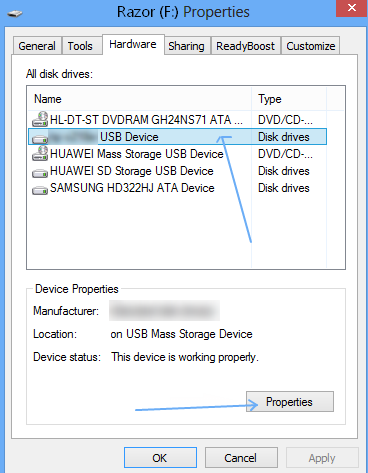


6) Check the radio button Better Performance then click OK

enjoyee

TAGGED UNDER:

3 Tools to Reveal Who's Hacking your WiFi


While using your home WiFi internet access you might face some slow downs of speed, this may be due to a normal internet down time or (if it persists for a long time) your wifi may be got hacked by a nearby hacker. There are many ways to protect your home Wi-Fi from being hacked, such as using a custom & hard to guess password or also changing the encryption type of the wireless key to WPA or WPA2 as they are meant to be more secure but not perfect against hackers. As we've seen there's a way to Hack WPA/WPA2 Passwords using PIN vulnerability, that means even if you think your WiFi is protected with WPA/WPA2 encryption doesn't mean it cannot be hacked.


3 Tools to Reveal Who's Hacking Your WiFi

 1. Wireless Network Watcher 

Wireless Network Watcher programmed by Nirsoft, it helps you analyzing nearby computers connected to the same network (WiFi or Local network). It will analyze and list: Local IP address of the hacker, Computer/Device name, MAC address & other useful info.


2. Who's On My WiFi

Who's on my WiFi is an very easy to use tool that will provide many information about the locally connected hackers on your WiFi home network.


3. NetCut

The famous internet cutter can also be used to analyze who's taking your internet connection after hacking your wifi. Netcut helps you also cut down internet access to connected users even if they know the wifi password, which also helps you protecting yourself from others using netcut.


enjoyeee

Saturday, 18 January 2014

10 Best Android Secret Tips and Tricks


10 Best Android Secret Tips and Tricks

Android is the Linux based operating system designed primarily for touch screen mobile phones. Now a days android phones are so much popular that they covered almost 65% of total mobile phones market.They are rich in functionality as well as user friendly. Many android users don’t know much about the hidden features of Android phones. Today we are sharing an article which will tell you the best secret android tricks and hidden features of android phones. Different versions of android versions support different set of android tricks, so try all the following android tricks. I am not sure which will going to work on your handset.

1) Force reboot: 
Many times android users face a problem of freezing of mobile phone, In case your android phone is frozen, you can reboot it using an android trick.

Just press Power Button+ Home Key + Volume up button simultaneously.

2) Quick Google Access:
Android phones built primarily for internet, many of android users don’t know that android phones provide a way by which we can access Google search in just a single click. To use this android trick,

Press menu key and hold it for couple of seconds, it will launch the Google search.

3) Reboot COMPUTER TRICKS AND SOFTWARE HACKING
roid in safe mode: 
As like computers, we can also reboot android phones in safe mode. The latest android jelly bean version provides an option to reboot in safe mode, if something goes wrong.
To reboot your android in safe mode, follow the below given instructions.

*Long press the power button
*Long press on the power off option.

Android phone will show a confirmation message about rebooting it in safe mode, if we reboot android phone in safe mode then all the 3rd party application will be disabled. These applications can again be enabled when we reboot our phone normally. This is a great android utility in case when, one of your 3rd party application is causing trouble for you and you want to hunt it.

4) Unlock android phones by face detection: 
This is a cool android trick by which you can unlock your phone by using face detection, In the jelly bean version, android provides a way by which android phone can be unlock using face detection, to make this feature more secure, jelly bean version added another layer of protection in which android phone can be unlocked only when the face is matched as well as we have to blink eyes in order to unlock phone. Blinking eyes tells the android security system that person is live and it’s not an illegal attempt of unlocking using a still image.
To activate this,

Go to Settings > Security > Screen lock > Face unlock.

5) Get detailed information about phone status:
We can get the detailed statistics like phone information, battery information, usage statistics and WiFi information by just dialing *#*#4636#*#*

This is a handy USSD to get the details about battery usage, DNS check, Ping, Application time usage time and so on.

6) Move android apps to SD card: 
Its good idea to install android apps in SD card, but what if you installed apps on your phone memory. Don’t worry android phones provide a way by which we can move our apps to SD card. To move apps to SD card, follow these steps:

Go to settings > Application settings > Manage application > Select the application, You will see the option “Move to SD card”.

7) Hard Reset and Factory reset your android phone: 
This android trick comes handy at the time of selling an android phone. Android phone can be formatted in two ways

Factory reset
Hard reset

a) Factory reset: In factory reset, your phone is being formatted to factory level. Means all the settings will go by default and all the internal data will be deleted. To factory reset a phone dial *#*#7780#*#*.

b) Hard reset: To hard reset a phone dial *2767*3855#, this will delete all the data (including internal and External SD data) as well as settings of android phone. Don’t try this code for testing purpose, until you are not sure. It will not ask for a confirmation.

8 ) Context menu in android:
long press on the screen, will show you additional options for customizing android phones. This context menu is somewhat similar to the right click menu of most operating systems.

9) Taking screen shots on android phone:
Android phones offer a great feature by which we can take the screen shot without using any 3rd party application. However the screen shot android tricks vary from one android version to another version.

Press the Home button + power button (This trick work on most android phones.)
For Galaxy Nexus: Power button + volume down button.
For Galaxy Note 2 and S3: Swipe your palm on the screen to take screen shot.

10) Android Version Animation: 
This is another cool android trick to play with your android phone.
To use this android trick, Go to settings > about phone > Tab repeatedly on ‘Android version’.
After sometime, the android version will be animated.

Enjoy..!!!

Wednesday, 15 January 2014

Internet Download Manager IDM 6.14 Final Incl Crack and Serials by A.k


Internet Download Manager IDM 6.14 Final Incl Crack and Serials link!!!!!!!!!!

Download from these link

IDMan_614 setup
IDM SETUP CLICK HERE

IDMan_crack
IDMan_crack click here

Serials KEY
Serials key click here

InstallNotes
InstallNotes click here

ENJOYEEEEEEEE...
comment...

TAGGED UNDER:

New Awesome Facebook Chat Trick

facebook chat trick
 Facebook has recently made changes to its chat features. Now we can use profile images in chat. You can even type anything in colour using a simple trick. You just need to know how to get facebook profile id which you will learn by reading this article Trick to find facebook profile id. Below are codes of A-Z and guide on how to use them in chat.


       1. How to use facebook profile images in chat ?
  • To use profile images in chat Enter this ==> [[username]]
  • In place of username enter username of person whose image you want to showin chat. 
  • If u will enter Pc TiPs AnD TriCkS this will show image of my page. 


       2. Codes of A-Z for Facebook chat.

  • Below are codes of A-Z which you can use in facebook chat. You can create your on words with this codes. I will demonstrate how to do that .
[[107015582669715]]  = A
[[116067591741123]]  = B
[[115602405121532]]  = C
[[112542438763744]]  = D
[[115430438474268]]  = E
[[109225112442557]]  = F
[[111532845537326]]  = G
[[111356865552629]]  = H
[[109294689102123]]  = I
[[126362660720793]]  = J
[[116651741681944]]  = K
[[115807951764667]]  = L
[[106596672714242]]  = M
[[108634132504932]]  = N
[[116564658357124]]  = O
[[111669128857397]]  = P
[[107061805996548]]  = Q
[[106699962703083]]  = R
[[115927268419031]]  = S
[[112669162092780]]  = T
[[108983579135532]]  = U
[[107023745999320]]  = V
[[106678406038354]]  = W
[[116740548336581]]  = X
[[112416755444217]]  = Y
[[165724910215]]        = Z
       

      3. How to use this codes ?

  • First think wat word you want to create then pick up codes of that alphabate from above codes
  • Let us create hi . So pick up codes of H and I .
  • After that enter this in chat box  [[111356865552629]]  [[109294689102123]] 
  • Make sure there is space in between any two codes or else it will not work.
     

      4. Some Cool Facebook tricks.

  • Below are two codes to show Happy New year you can use any one of them
[[124641767652266]] [[124642810985495]] [[124643044318805]] [[124643044318805]] [[124643487652094]] [[124642300985546]] [[124644090985367]] [[124644404318669]] [[124644567651986]] [[124642300985546]] [[124643487652094]] [[124644404318669]] [[124642810985495]] [[124645367651906]] [[124642300985546]] [[124645977651845]] [[124646247651818]] [[124646574318452]] [[124645977651845]] [[124642300985546]]


OR


[[337992182896839]] [[225777904163650]] [[244015585667152]] [[244015585667152]] [[319152701438185]] [[188142511282558]] [[319977728035866]] [[316759491692170]] [[139287272851910]] [[188142511282558]] [[319152701438185]] [[316759491692170]] [[225777904163650]] [[337598512918963]] [[188142511282558]] [[141281852650929]] [[268263169900550]] [[191790684249921]] [[141281852650929]]
  • This way you can create your own words your name .
  • Hope you like it subscribe below for such more tutorials and feel free to leave comments.
enjoy!!!!!!!!!!!!!!!!!!!!!!!!!!!!!!!!!!!!!!!!!!!!!

Introducing Whatsapp Plus -A Modern Whatsapp

Whatsapp   TF
A Modern Whatsapp

WhatsApp is whole new messaging experience. WhatsApp Messenger is a smartphone messenger available for Android and other smartphones. WhatsApp uses your 3G or WiFi (when available) to message with friends and family. Switch from SMS to WhatsApp to send and receive messages, pictures, audio notes, and video messages. First year FREE! ($0.99 USD/year after).

About Whatsapp Plus


Whatsapp Plus is the new modified version of whatsapp. Its modded with some  unique features which turns the old boring whatsapp into a new experience. Whatsapp Plus comes with extra mods which can customize the user experience and give a awesome look.


Lets Start The Tour:


Requirments:


Requirments?? As simple to say it is same the old whatsapp, supporting almost every platform.


Note: Some new features of Android Whatsapp Plus is only available for android version 4.4.x.


Features:


This part is really going to be interesting as there are tons of features which Whatsapp Plus give birth to.


We will split the features in different sections.


Outer Features


 1. Color:


icon color


There are rumors that the whatsapp logo color will change after doing a  shitty survey. But the truth is you get nothing and waste your time in all these. Whatsapp Plus comes with a option which can turn your logo to almost every color. There are some colors which are already modded.


Inner Features:


1. Themes:


themes


This is the key feature of Whatsapp Plus. It has embeded theme store from which you can download different varieties of themes by various theme authors to customize your whatsapp inner beauty.


2.  Appearance:

mod appearance


In this feature you can customize almost everything in your whatsapp inner look. You can customize the Conversation Screen, Main/Chats screen, Contact Screen, Popup Notification Settings, Media Sharing and dozens of other mods.


3. The Private Feature — Hide Your Online Status


hide online status


This is the most rare used feature of this beast messenger. 
Why?
The answer is you have to pay to enable this feature. It requires a premium application to be installed in your phone which can be downloaded via app store.
Though there are many geeks who find this interesting and actually buy this premium feature.


Final Words


Whatsapp Plus is a nice alternative to whatsapp as it allows great customization to make the user experience more comfortable. This application is not currently available in any app store.


You can download this application from below link:


enjoy!!!!!!!!!!!!!!!!!
☻☻☻☻☻☻☻☻☻☻☻☻☻☻☻☻☻☻☻☻☻☻☻☻☻☻☻☻☻☻☻☻☻☻☻

TAGGED UNDER:

Watch Star Wars Movie In CMD


 This is very intersting and amazing command prompt trick which will play star wars movie in the command prompt or cmd. Below are complete steps with screen shots for this trick with. Without wasting time lets gets started.


       1. Go to start > Run and type in cmd and press enter
       2. Now type in telnet as shown below and press enter.


       3. After that enter o as shown below and press enter.


       4. Next enter towel.blinkenlights.nl as shown below and press enter.


       5. Now star wars movie will start playing on your command prompt.


       6. Enjoy !! and dont miss to subscribe below .

SHARE

ad

Contact Form

Name

Email *

Message *

Copyright © 2014 | Pc TiPs AnD TriCkS | REFERENCE | Pc TiPs AnD TriCkS |
Designed By: | ANOOP KAUSHAL | Powered By: | Pc TiPs AnD TriCkS | All Right Reserved.|